Advice for UK Consumers

Be safe - Protect your identity
This page provides information on how to protect yourself from identity theft, tips on to stay safe online, advice on how to check your credit rating, and some tips on other ways to stay safe...
Protect your identity
Identity theft is on the increase. It's remarkably easy for someone to get information on you, get access to your credit card, account details or home address. Be extra vigilant with credit card details and statements.
Below are some basic tips for identity protection - also, read the section below on 'Protection online'
| Credit cards |
Remember that crooks don't need your card to help run up your bill... just the card number and expiry date. Keep safe. Also, think about the following:
|
| Paperwork |
Argos stock five shredders, with prices from £17.99 to £62.99 (including Fellowes Shredders), the main difference being the size of the bin (between 12 and 25 litre capacity). Better still, check out the range of Shredders from Euroffice Getting a mains-powered paper shredder for home is affordable, and could save you a lot of hassle. |
| PIN numbers |
Common sense applies here:
|
| Telephone |
|
| Public records |
If you want to be removed, follow the link to 'Privacy policy' and print
out their Record Correction form. |
| Home computer |
Imagine if your computer were to be stolen - letters, bank details, personal information, address book and calendar. How much data would you lose?
|
| Important documents | Your passport, birth certificate and driving licence should be locked away safely. There's no need to carry your driving licence around with you, and keeping it in your wallet or handbag can be dangerous, especially as it contains your home address. |
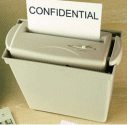 Consider
a document shredder. Think of how many bank statements, bills and
credit card slips you chuck in the bin, and how they could be used as
proof of identity.
Consider
a document shredder. Think of how many bank statements, bills and
credit card slips you chuck in the bin, and how they could be used as
proof of identity.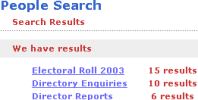 The
big one here is the Electoral Roll (controlled by your local
council). First off, go to
The
big one here is the Electoral Roll (controlled by your local
council). First off, go to
Be safe online
| E-mails |
|
| Viruses and attacks |
Get yourself a good security application, and make sure you keep it up-to-date. We recommend Norton Internet Security, which contains an AntiVirus program (for files and emails), an anti-spam tool, and a Firewall to stop unwanted instructions. The program should be configured for automatic update, to download the latest virus definitions as soon as possible. Norton is available from Amazon or Dabs.com. Test your security now: Try the Symantec Security Check |
| Website check |
Amazingly, many of us have personal information that's used by banks, sitting on public web pages...
|
| Passwords |
|
| Website owners |
If you run a UK website, your details can be publicly available. UK domains are controlled by Nominet. Go to their site and perform a WHOIS search for your domain to see what's on file under 'Registrant' for your site. If there's something there that shouldn't be - contact your ISP / hosting company and tell them that you want to opt-out. They'll arrange to update the domain name record held by Nominet on your behalf. |
 When
your computer connects to the
When
your computer connects to the Check your credit status
There are three main UK credit reference agencies that financial organisations use when checking your identity or processing an application for credit or financial services. For £2, each company has to provide you with a copy of what they hold on file for you. This includes:
-
Information on currents loans
-
Electoral roll information
-
Old addresses
-
County Court Judgements
-
A list of companies that have performed recent 'checks'
It's well worth paying £2 to each of the following to get hold of the information they hold on you:
- Experian - Various services available, but a summary can be requested and paid for online. Report is posted. Enhanced services are offered by Experian at www.creditexpert.co.uk
- Equifax - £2 for the basic statutory form sent by post, or a plain-English version online for £8.25
- Callcredit- £2 for the basic statutory form sent by post - a PDF form can be downloaded. A text message service available.
- Annual Credit Report - Get free access to a basic credit check, in return for signing up to an email newsletter
If you're serious about your credit score, you can get a free Experian credit report and a free trial of Experian's CreditExpert Monitoring Service. More details of this offer at www.creditexpert.co.uk.
A similar service is offered by Equifax.
If moving house, it's worth ordering the £2 reports after a few months, to see who still has your old address on file
Reduce your mail
- When completing your annual electoral roll form for your local council, tick the "Opt out of the Electoral Roll for marketing purposes" option
- Reduce the amount of unsolicited or junkmail you receive, by registering at the Mailing Preference Service. Go to www.mpsonline.org.uk and fill in the online form for removal from major mailing lists
Check out companies
-
Check that a company's still in business at the Companies House website
- If buying from a company for the first time, have a quick search for the company name, plus the word "complaint" on Google, or see the list of consumer complaint sites on our Making a Complaint advice page.
Check out cars
- Before buying a car, get it checked out. Go to www.theaa.com where for a small fee, they can run an AA Car Data Check, to check mileage, outstanding finance, and whether the car has been reported stolen, plus lots more.
Other links
- Take a look at Free ID Protection a proactive means of securing your credit files. The site provides free Notice of Correction letters which are sent to the 3 Credit Reference Agencies.
- Thanks to site visitor James for suggesting the following link: BBC Moneybox report - this offers some proactive advice including getting a Notice of Correction added to your credit files.
 Del.icio.us
 Digg
Digg StumbleUpon
 Technorati
 Facebook
