Advice for UK Consumers

Lloyds TSB - Classic Plus account information
In October 2003, Lloyds TSB announced a new family of current account, known as "Classic Plus". For some time, the current account in the UK with the best interest rate was the online bank, Cahoot, but the new accounts from Lloyds TSB put them "streets ahead", according to their marketing. This page takes a quick look at the Lloyds Classic Plus account.
Benefits
-
Online and phone banking
-
Some of the highest interest rates around for an online current account
-
Easy to switch from your existing account
-
Interest-free overdraft
If you're
prepared to pay in £1000 a month, the new Lloyds account offers some pretty impressive rates for a current account. You also have to commit to logging on
to their site six times
every three months. For
more details, go to www.lloydstsb.co.uk
The signup process

-
Select 'Classic Plus' as an account, and specify whether you'll be paying in £1000 or £2000 a month (you can also select a 'Classic' account)
-
Name, date of birth and nationality
-
Phone number, address (and previous address if moved in the last three years)
-
Employment status, employers name & address, and years with employer
-
Banking - details of your current account provider, number of current, savings and mortgage accounts you have, and whether you'll close your main account
-
Financial - Net income each month, how much you'll be paying into the account, and how you receive your income
-
Account setup - Which branch of Lloyds should be your home branch
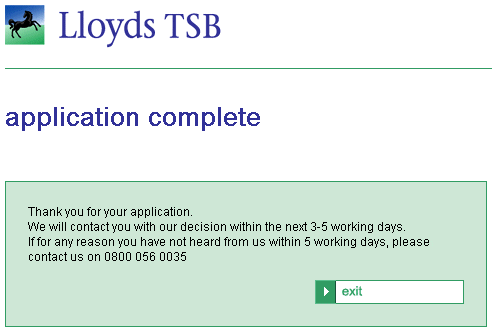
After five days, we received an account offer, some forms to sign (a classic account, classic plus account, and a PhoneBank Express form) and were asked to provide two documents to prove identity and address.
Three days after signing and returning, we received a welcome pack, followed two days later by a debit card and chequebook. The account is now up-and-running.
Internet Banking
The last step for us, was to get the Lloyds TSB Online banking account set up. You can do this online at www.lloydstsb.co.uk, by entering your name, date of birth, sort code, account number and a password. You then have to allow a full working day for account processing before calling to verify your identity and answering some security questions. We did this, only to find out that you can't get your online access sorted until one debit has gone through the account (as they use a recent transaction to verify your identity). After making our initial debit, we were able to call and complete the identity checks. Shortly after this, we received a letter containing our online banking ID. Armed with this, the password we created when we first started, and after creating a memorable keyword, we were able to log on.
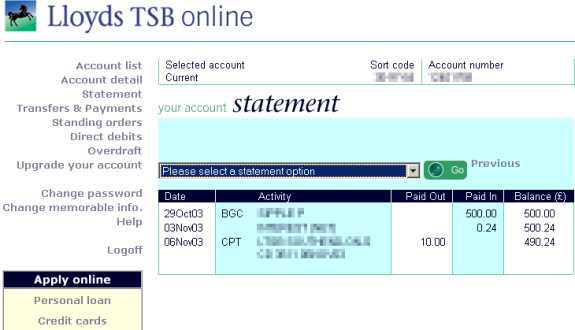
Screenshot of
Lloyds TSB Online Banking
The online banking service is pretty easy to use, and very clearly laid out. The following tasks can all be done online:
- Print, view and download a statement (CSV or Quicken)
- Pay bills or transfer money to other people
- Setup standing orders
- View direct debits
- Apply for an overdraft
- Change password / memorable information
- Send an email to an advisor
More details can
be found at www.lloydstsb.co.uk
You can also
call 0800 056 0020 (between 8am - midnight, 7 days a week.)
If you need help connecting to Online Banking, call Lloyds TSB on 0845 3000
116.
Telephone Banking
With the Classic Plus, you can have telephone banking services. There are two types, an automated service called PhoneBank Express, or a standard call center, for when you need to speak to a human
The call centre can be contacted on 0845 072 3333 (8am-8pm Mon-Fri, 9am-1pm Sat). You'll need sortcode, account number and phonebanking PIN number.
PhoneBank Express is the automated service, which you'll need to register for. When you do, you'll be posted a membership number. Call 0800 015 2000, and type in the membership number. You'll be asked for some digits from your phonebanking PIN, and then get to a menu, where you can select an option by tone or by speaking. Key commands are:
- Balance. Press 1 or say "Balance"
- Pay bills. Press 2 or say " Bill Payment"
- Transfer money. Press 3 or say "Funds Transfer"
- Order printed statement. Press 4 or say "Order statement"
- Find an item (by cheque number or amount). Press 5 or say "Item search"
- List of recent transactions. Press 6 or say "Recent Transactions"
- Other commands: "Yes" (press 1) and "No" (press 2)
Text Message Banking
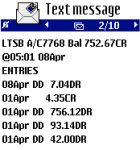
A new service introduced in March 2005 - Get your balance and a list of recent transactions sent to your mobile for free.
Summary
We've had the account
up and running since mid-October, and so far, it's been pretty good, especially
the automated PhoneBank Express service. We'll update this page with anything
new we discover.
More details can be found at www.lloydstsbcurrentaccounts.com
You can also
call 0800 056 0020 (between 8am - midnight, 7 days a week.)
 Del.icio.us
 Digg
Digg StumbleUpon
 Technorati
 Facebook
Finance Deals
Insurance Info
Credit Cards
Barclaycard
BT Credit Card
Tesco Credit Card
Egg Credit Card
First Direct Review
Halifax
Lloyds TSB
Household Bills
Finance
Internet
Digital TV
 |
 |