Advice for UK Consumers

Salter MiBody Analyser Scales Review
On this page, you'll find a review of Salter's MiBody scales - the scales with a USB socket so you can track your health on a PC
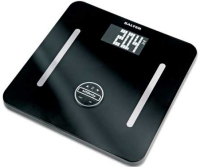 A set of bathroom scales for the 21st century. For a while, it's been possible to buy scales that can record your weight, or present you with your BMI (Body Mass Index), but these scales from Salter offer a much more sophisticated level of information.
If you're serious about tracking your weight and fitness (perhaps for yet another diet...), then these could be for you. The Salter MiBody is comprehensive body analyser that will determine your weight, body fat, body water, muscle mass, visceral fat, BMI and BMR, giving you a more accurate reading of your overall health and fitness than standard scales.
The MiBody can 'remember' up to 12 people, and can store up to 30 readings per person. OK - so very clever, but how useful is that information? The data recorded only really becomes useful when you transfer the data to a computer... which is a piece of low-calorie cake.
Deals on the Salter MiBody:
|
Salter MiBody Review
Our podcast team recently reviewed the Salter MiBody scales. If you're interested in hearing their review, take a listen to FrequencyCast Show 35.
The Salter MiBody is made from toughened safety glass, this is a stylish black set of scales with Stainless Steel contacts and a 2 inch LCD 2in dot matrix display.
The first time you use the scales, you have to enter in your age, gender and height, which are then used for the calculations.
Weighing yourself with the scales is pretty straightforward. You wake the MiBody up from standby by pressing down on it. Then, use the up/down arrows to select your profile from one of the 12 memories. Step on the scales when indicated, and wait for around 10 seconds, while the MiBody does its stuff. You have to be barefoot, as the MiBody sends tiny electrical pulses into you to determine your body's fat and water content (you won't feel these, by the way!)
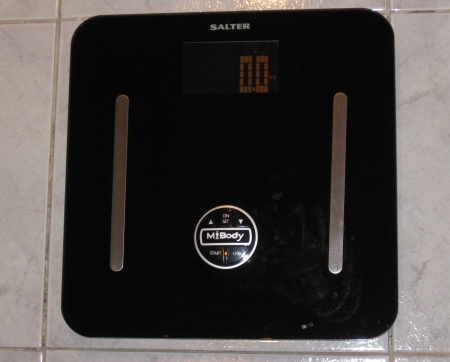
When we tested the scales, we did occasionally see "Err" appear, but usually this went away on the second try - perhaps we moved at the wrong moment, or weren't square on the metal contacts.
Here's what the scales monitor:
- Body fat (as a percentage)
- Body water content (your body water, as a percentage)
- Muscle mass (percentage of your body's muscle or lean tissue),
- Visceral fat (the fat surrounding your key organs)
- Body Mass Index (to identify the healthy weight for your height)
- BMR (Basal Metabolic Rate) Calories your body burns at rest
Once you're happy that your results have been recorded, the clever bit comes in. The MiBody is supplied with a CD and a USB memory stick. Plug the memory stick into the side of the scales, and press the USB button. The stored data on the MiBody is transferred from the scales to the memory stick, and you can then plug the stick into a PC and analyse readings using the supplied Salter MiBody software.
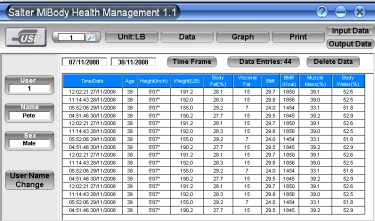
Salter MiBody List view
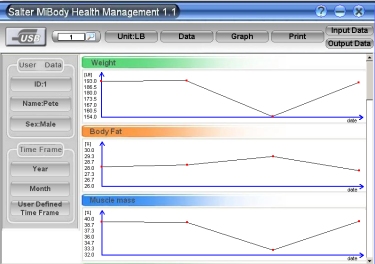
Salter MiBody Graph view
Salter MiBody Specs:
- 12 user memory
- Easy to read LCD display
- Capacity: 200kg / 31st 6lb
- 6 x AA batteries (included)
Summary:
A well-made set of scales that can provide a high level of detail on your weight, body mass index and a range of other metrics. Works well, although the buttons seem a little unresponsive sometimes, and the LCD display could be a little brighter.
We're happy to recommend this.
Note - Software runs on Windows 2000, Windows XP and Windows Vista
MiBody FAQ:
Software: I have just purchased a set of Salter scales. Unfortunately they did not come with a CD to analyse the results. I was wondering if i could be sent a CD? (Elli J, Feb 2009)
- Good news is that you can download the MiBody software direct from Salter's site at www.mibody.co.uk
Clock? How do I set the clock?
- Wake up the scales by pressing the platform
- With 0.0 on screen, hold down the On/ Set button until the year starts flashing
- Use the up and down allows to set year, then press the On/Set to accept
- Do the same for month, day, hours and minutes
Windows 7 - One of our visitors has reported problems with using the MiBody software on Windows 7. Here's what we have discovered:
Customers should download the latest MiBody software from www.mibody.co.uk. There is a note on their site stating the following: "On Windows 7, when opening the software for the first time, right-click the desktop icon, and select "Run as administrator". After this, the software can be opened by double clicking on the desktop icon."
Support: If you need support, try Salter's UK Customer Service number, 01732 360783, or go to the Salter UK website.
Fat rating: Does the fat content result include visceral fat or only subcutaneous fat?
- There are two fat readings, "Body fat" (a percentage) and "Visceral fat". From the manual:"Visceral fat is located in your abdominal cavity and surrounds your vital organs. The Salter MiBody will give you a visceral fat rating between 0 - 29."
Other Links
- Fitbug Review - Earn Nectar points and keep fit with this unique fitness programme
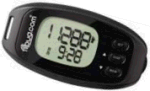
Get healthy with a Fitbug
See our Fitbug review or go to www.fitbug.com |
 Del.icio.us
 Digg
Digg StumbleUpon
 Technorati
 Facebook
Computers / Games
Digital TV
DVD Shopping
Finance
Gadget Shopping
Gifts Ideas
Gifts 4 Girls
Insurance
Internet
Mobile Phones
Photography
Travel
Household Bills
Finance
Internet
Digital TV
 |
 |