

On this page, you’ll find information about how to access your o2 mobile phone bill online, as well as a collection of screenshots to demonstrate what tools are available to o2 mobile phone customers.
How to access your o2 bill
The tools offered by o2 for checking your mobile phone call usage are actually pretty good.
- To access your bill, go to http://www.o2.co.uk/myo2
- Once there, select View Mobile Bill
The o2 online billing system offers a range of excellent tools, including detailed reports, graphs, exports and printer-friendly summaries can
be now be generated.
Below are some screenshots of the new system,
as an example of what’s on offer…
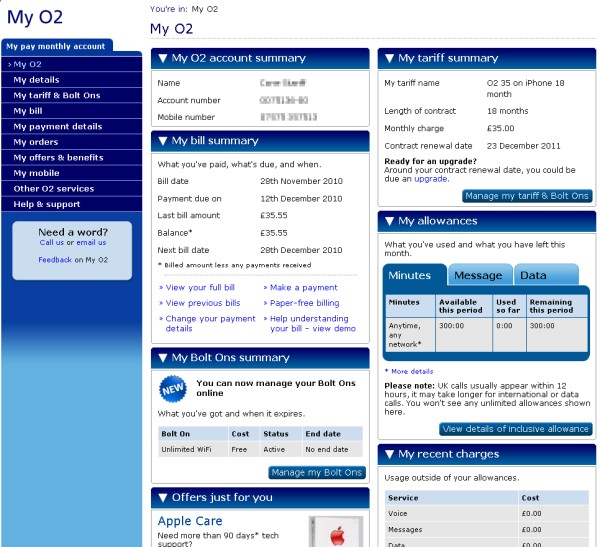
Bill summary
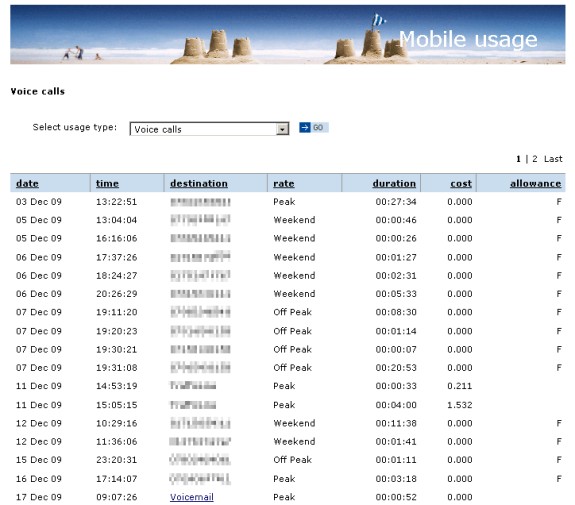
Sample snippet from an itemised bill
Check your usage with a variety of reports
Common o2 Bill Questions
Problems viewing your bill?
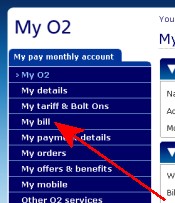
Having problems viewing your bill? Here’s what you need to do…
To view your bill, go to the following web address: http://shop.o2.co.uk/mybill
You’ll be prompted for a username and password, which were supplied to you by o2. Enter these where prompted,
then press the “Go” button.You’ll then have a screen with several options. Press the “My Bill – Go” option (top left of webpage – see screenshot).
If you still have problems, the best advice is to contact o2 directly.
I
can’t view the numbers of people I’ve sent text messages to.
You don’t get to see
the number that you sent a text message to, only the SMS
Service Centre number. This is by design.